WordPress 性能优化:服务器优化
This content is for Legacy. Switch to the latest version for up-to-date documentation.
加速:服务器优化
Section titled “加速:服务器优化”使用 Nginx 替代 Apache
Section titled “使用 Nginx 替代 Apache”虽然 Apache 对于 PHP 的处理更好,但是 Nginx 本身更加轻量,能够花费更少的系统资源。在 Nginx 节省的资源将会用到 PHP 中。
为 PHP 开启 OPCache
Section titled “为 PHP 开启 OPCache”什么是 OPCache
Section titled “什么是 OPCache”当解释器完成对脚本代码的分析后,便将它们生成可以直接运行的中间代码,也称为操作码(Operate Code,OPCode)。OPCode Cache 的目地是避免重复编译,减少 CPU 和内存开销。如果动态内容的性能瓶颈不在于 CPU 和内存,而在于 I/O 操作,比如数据库查询带来的磁盘 I/O 开销,那么 opcode cache 的性能提升是非常有限的。
启用 OPCache
Section titled “启用 OPCache”默认情况下 PHP 会安装 OPCache,但是不会启用,我们可以通过在 php.ini 中添加如下代码,开启 OPCache。
; 开关打开opcache.enable=1
; 可用内存酌情而定,单位 megabytesopcache.memory_consumption=256
; 对多缓存文件限制,命中率不到 100% 的话,可以试着提高这个值opcache.max_accelerated_files=5000
; Opcache 会在一定时间内去检查文件的修改时间,这里设置检查的时间周期,默认为 2,定位为秒opcache.revalidate_freq=240
; 设置缓存的过期时间opcache.revalidate_freq=0
; 控制内存中最多可以缓存多少个PHP文件opcache.max_accelerated_files=7963

; 是否快速关闭,打开后在 PHP Request Shutdown 的时候回收内存的速度会提高opcache.fast_shutdown=1
; 不保存文件/函数的注释opcache.save_comments=0
为 MySQL 开启 Query Cache
Section titled “为 MySQL 开启 Query Cache”通过为 MySQL 开启 Cache,可以加快 WordPress 的查询速度。
在 MySQL 的配置文件 my.cnf 中添加如下代码,并重启 MySQL,即可开启 MySQL Query Cache。
query_cache_type = 1query_cache_limit = 1Mquery_cache_size = 16M但是,需要注意的是,MySQL Query Cache 并不适合所有场景,如果你的博客浏览量较大、且更新频率不高,可以考虑开启 Query Cache,如果更新频繁且浏览量不大,那么 Query Cache 反而可能带来负效应。
http://www.orczhou.com/index.php/2009/08/query-cache-1/
为服务器开启 Gzip 压缩
Section titled “为服务器开启 Gzip 压缩”为程序加入 Gzip 压缩,可以有效减少传输数据的大小。一般来说,我们可以使用如下几种方式开启 Gzip。
cPanel 可以直接在面板的“优化网站”中开启 Gzip。
在 WordPress 中开启 Gzip
Section titled “在 WordPress 中开启 Gzip”可以在根目录下的 index.zip 中添加如下代码,以开启 Gzip 压缩。
// 此代码需要放在 define('WP_USE_THEMES', true); 后,ob_start(‘ob_gzhandler’);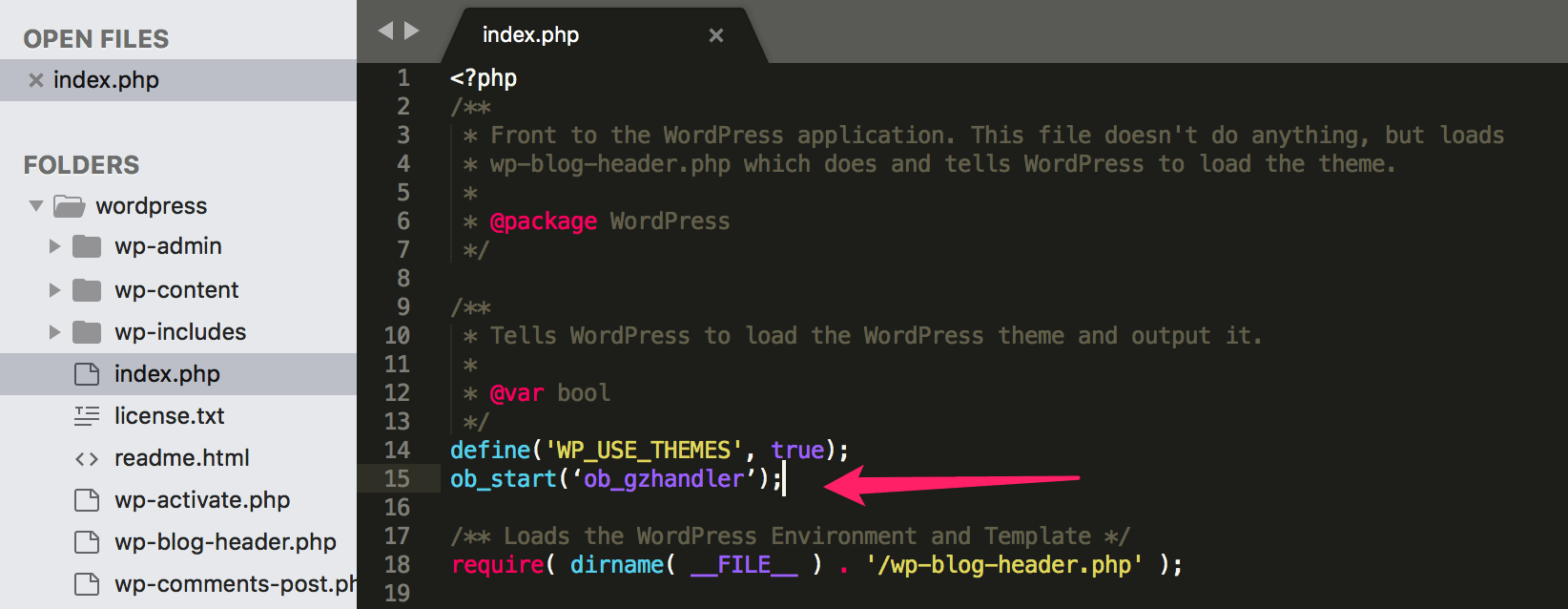
通过 Apache 的 .htaccess 文件开启
Section titled “通过 Apache 的 .htaccess 文件开启”可以在网站根目录中的 .htaccess 文件中添加如下代码,以开启 apache 的 gzip 压缩:
<IfModule mod_expires.c>ExpiresActive OnExpiresByType image/gif A2592000ExpiresByType image/jpeg A2592000ExpiresByType image/png A2592000ExpiresByType image/x-icon A2592000ExpiresByType application/x-javascript A604800ExpiresByType text/css A604800</IfModule><IfModule mod_deflate.c>SetOutputFilter DEFLATEAddOutputFilterByType DEFLATE text/html text/css image/gif image/jpeg image/png application/x-javascript</IfModule>通过 Nginx 的 Conf 文件开启
Section titled “通过 Nginx 的 Conf 文件开启”在 nginx.conf 中添加如下代码,则可以开启 Gzip 压缩:
gzip on;gzip_disable "msie6";
gzip_vary on;gzip_proxied any;gzip_comp_level 6;gzip_buffers 16 8k;gzip_min_length 256;gzip_http_version 1.1;
gzip_types text/plain text/css text/x-component text/html application/json application/x-javascript text/xml application/xml application/xml+rss text/javascript application/javascript image/x-icon image/svg+xml image/jpeg image/gif image/png font/opentype;
通过 php.ini 开启
Section titled “通过 php.ini 开启”可以通过给 php.ini 中添加如下代码,来开启 gzip 压缩:
zlib.output_compression=Onzlib.output_compression_level = 5通过 WP Super Cache 开启
Section titled “通过 WP Super Cache 开启”通过 WP Super Cache 可以开启压缩,具体可以看下第 10 课相关内容。
为文件加入 expires 头信息
Section titled “为文件加入 expires 头信息”通过加入 expires 头信息可以让静态文件优先使用缓存,提升加载速度。
大部分时候,我们上传的图片都不会发生改变,使用缓存可以帮助加速浏览。
可以通过在 .htaccess 中添加如下代码。
# BEGIN Expire headers<ifModule mod_expires.c> ExpiresActive On ExpiresDefault "access plus 5 seconds" ExpiresByType image/x-icon "access plus 2592000 seconds" ExpiresByType image/jpeg "access plus 2592000 seconds" ExpiresByType image/png "access plus 2592000 seconds" ExpiresByType image/gif "access plus 2592000 seconds" ExpiresByType application/x-shockwave-flash "access plus 2592000 seconds" ExpiresByType text/css "access plus 604800 seconds" ExpiresByType text/javascript "access plus 216000 seconds" ExpiresByType application/javascript "access plus 216000 seconds" ExpiresByType application/x-javascript "access plus 216000 seconds" ExpiresByType text/html "access plus 600 seconds" ExpiresByType application/xhtml+xml "access plus 600 seconds"</ifModule># END Expire headers